

How a CRM System Can Help Small Businesses Manage Leads and Customers

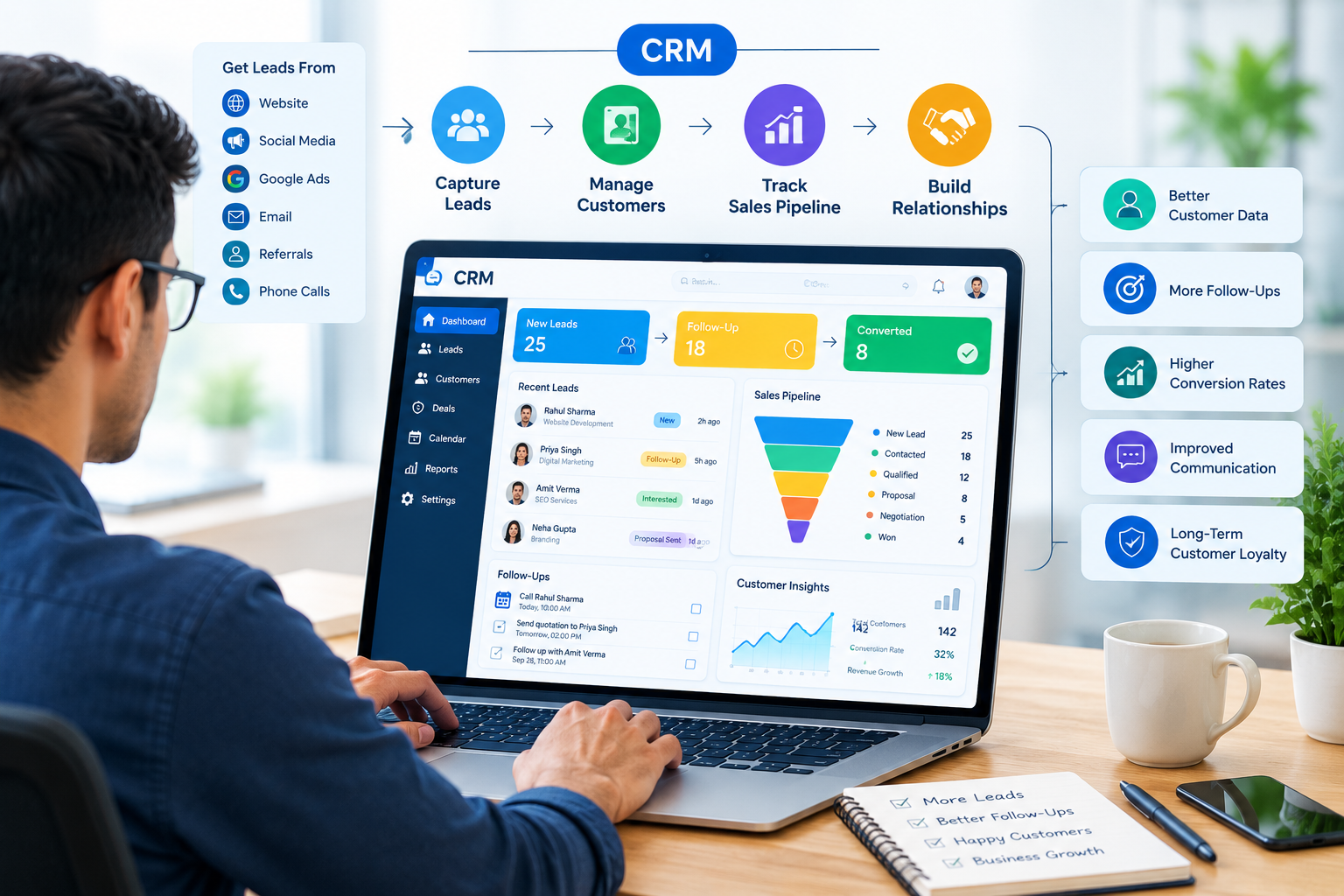
Managing leads and customers is an important part of running a successful small business. As a business grows, customer information can quickly become difficult to organize when it is stored across spreadsheets, emails, phone contacts, WhatsApp conversations, and notebooks.
A CRM system for small businesses provides a centralized way to manage leads, customer information, follow-ups, sales activities, and customer relationships. Instead of manually tracking every enquiry, businesses can use CRM software to create a more organized and efficient sales process.
But how exactly can a CRM system help a small business? Let's explore the key benefits.
What Is a CRM System?
A Customer Relationship Management (CRM) system is software that helps businesses manage interactions and relationships with potential and existing customers.
A CRM can store important information such as:
- Customer names and contact details
- Lead sources
- Customer requirements
- Sales conversations
- Follow-up dates
- Quotations and deals
- Purchase history
- Customer support information
- Sales pipeline stages
By keeping this information in one place, a CRM can make customer and lead management more organized.
Why Do Small Businesses Need CRM Software?
Small businesses often receive leads from several different sources, including:
- Google Ads
- Facebook Ads
- Business websites
- Phone calls
- Referrals
- Walk-in customers
Managing all these enquiries manually can become difficult.
A small business CRM can help bring this information into one organized system. Sales teams can see which leads are new, which customers require follow-up, and which opportunities have already been converted.
How Does a CRM System Help Small Businesses?
1. Centralizes Customer Information
One of the main advantages of CRM software is that it stores customer information in a centralized database.
Instead of searching through multiple spreadsheets or conversations, employees can access relevant customer information from the CRM.
For example:
Customer: Rahul Kumar
Lead Source: Google Ads
Requirement: Website Development
Status: Proposal Sent
Next Follow-Up: September 30
This makes it easier for sales teams to understand the customer's history before contacting them.
2. Helps Businesses Manage Leads
Lead management is one of the most important functions of a CRM system.
Businesses can organize leads according to their current stage:
New Lead → Contacted → Qualified → Follow-Up → Proposal → Negotiation → Converted
This gives sales teams a clear overview of their opportunities.
A CRM can also help businesses identify which leads require immediate attention.
3. Makes Follow-Ups Easier
Following up with leads at the right time can be difficult when everything is tracked manually.
CRM software can provide reminders and tasks for upcoming follow-ups.
For example:
- New enquiry received
- First call completed
- Quotation sent
- Follow-up scheduled
- Customer response recorded
- Next action assigned
This helps reduce the possibility of forgotten follow-ups.
4. Improves Sales Pipeline Management
A CRM allows businesses to visualize their sales pipeline.
A typical sales pipeline may include:
New Lead
↓
Contacted
↓
Qualified Lead
↓
Proposal Sent
↓
Negotiation
↓
Won / Lost
Business owners and sales managers can use this information to understand the current status of their sales opportunities.
5. Tracks Lead Sources
For businesses running digital marketing campaigns, knowing where leads originate is useful.
A CRM can help organize leads based on sources such as:
- Google Ads
- Meta Ads
- Organic Search
- Social Media
- Website
- Referral
- Direct Enquiry
This information can help businesses analyze their lead-generation activities and understand the customer journey.
6. Improves Customer Communication
A CRM can store previous customer interactions, making it easier for employees to understand a customer's requirements.
Sales representatives can review:
- Previous calls
- Emails
- Enquiries
- Quotations
- Purchases
- Follow-up notes
This can help create more consistent customer communication.
7. Automates Repetitive Tasks
Many CRM platforms offer automation features.
Depending on the software, businesses may automate:
- Lead assignment
- Follow-up reminders
- Email notifications
- Sales tasks
- Lead status updates
- Customer notifications
Automation can reduce repetitive administrative work and allow employees to spend more time on customer-related activities.
8. Helps Teams Work Together
When several employees handle customers, sharing information becomes important.
A CRM provides a common platform where authorized team members can view relevant customer information.
For example:
Marketing Team → Lead Generation
↓
Sales Team → Lead Follow-Up
↓
Sales Manager → Deal Management
↓
Support Team → Customer Service
This can improve coordination between different teams.
9. Provides Sales Reports and Analytics
CRM systems can provide useful reports about business activities.
Reports may include:
- Number of new leads
- Lead sources
- Follow-up activities
- Conversion rates
- Sales pipeline
- Revenue
- Sales performance
- Customer activity
These reports can help business owners understand their sales process and identify areas that need improvement.
10. Helps Build Long-Term Customer Relationships
CRM software is not only useful for acquiring new customers.
It can also help businesses maintain relationships with existing customers.
Businesses can use customer information to manage:
- Previous purchases
- Service history
- Customer preferences
- Support requests
- Follow-up opportunities
- Repeat business
This can support better customer retention and long-term relationships.
CRM vs. Traditional Lead Management
| Feature | Traditional Method | CRM System |
|---|---|---|
| Customer Information | Scattered | Centralized |
| Lead Tracking | Manual | Organized |
| Follow-Ups | Manual reminders | Automated reminders |
| Sales Pipeline | Difficult to track | Easy to monitor |
| Reporting | Limited | Detailed reports |
| Team Collaboration | Difficult | Centralized |
| Customer History | May be incomplete | Easily accessible |
What Features Should Small Businesses Look for in a CRM?
Before choosing a CRM, small businesses should consider their specific requirements.
Easy-to-Use Interface
Employees should be able to learn and use the CRM without unnecessary complexity.
Lead Management
The system should allow businesses to capture, organize, assign, and track leads.
Follow-Up Management
Look for reminders, tasks, scheduling, and activity tracking.
Reporting and Analytics
Useful dashboards and reports can help businesses understand sales performance.
Integrations
Depending on business requirements, integrations with websites, email, advertising platforms, and communication tools can be valuable.
Scalability
The CRM should be able to support the business as its customer base and team grow.
Pricing
Small businesses should compare the available features with their budget and actual requirements.
Benefits of Using a CRM for Small Businesses
A CRM system can provide several practical benefits:
- Better lead organization
- Faster follow-ups
- Centralized customer information
- Improved sales visibility
- Better team coordination
- Reduced manual work
- Easier reporting
- Improved customer communication
- More organized sales processes
How to Implement a CRM in a Small Business
Simply purchasing CRM software is not enough. Businesses should create a clear process for using it.
Step 1: Identify Your Requirements
Understand how your business currently generates and manages leads.
Step 2: Select the Right CRM
Choose software based on your team size, workflow, features, integrations, and budget.
Step 3: Organize Existing Customer Data
Move relevant customer and lead information into the CRM.
Step 4: Define Lead Stages
Create clear stages such as:
New → Contacted → Qualified → Proposal → Negotiation → Converted
Step 5: Train Your Team
Make sure employees understand how and when to update customer information.
Step 6: Monitor Performance
Use CRM reports to monitor lead activity, follow-ups, conversions, and sales performance.
Is a CRM Worth It for a Small Business?
A CRM can be particularly useful when a business is receiving more enquiries than it can comfortably manage through spreadsheets or manual processes.
If your business frequently experiences:
- Missed follow-ups
- Lost leads
- Duplicate customer records
- Unorganized customer information
- Difficulty tracking sales
- Poor communication between team members
then a CRM may help create a more structured customer management process.
Conclusion
A CRM system for small businesses can simplify the process of managing leads, customers, sales activities, and follow-ups. By keeping customer information organized in one place, CRM software can help businesses improve visibility across their sales pipeline and create a more consistent customer management process.
From capturing a new lead to maintaining an existing customer relationship, a CRM can support different stages of the customer journey.
For a growing small business, implementing the right CRM system can provide a structured foundation for managing customer relationships and sales activities more efficiently.
Frequently Asked Questions
What is a CRM system for small businesses?
A CRM system is software that helps small businesses manage customer information, leads, sales activities, follow-ups, and customer relationships from a centralized platform.
Is CRM software useful for small businesses?
Yes. CRM software can help small businesses organize leads, manage follow-ups, track sales opportunities, and maintain customer information.
Can a CRM help businesses manage leads?
Yes. A CRM can help businesses capture, categorize, assign, track, and follow up with leads throughout the sales process.
Does CRM software improve customer management?
A CRM can make customer information and interaction history easier to organize and access, supporting more consistent customer communication.
Can CRM software automate follow-ups?
Many CRM platforms provide reminders and automation features that can help businesses schedule and manage follow-up activities.
What should a small business look for in a CRM?
Important factors include ease of use, lead management, follow-up tools, reporting, integrations, scalability, security, and pricing.


Post a Review