
CRM and ERP Software for Business Process Automation

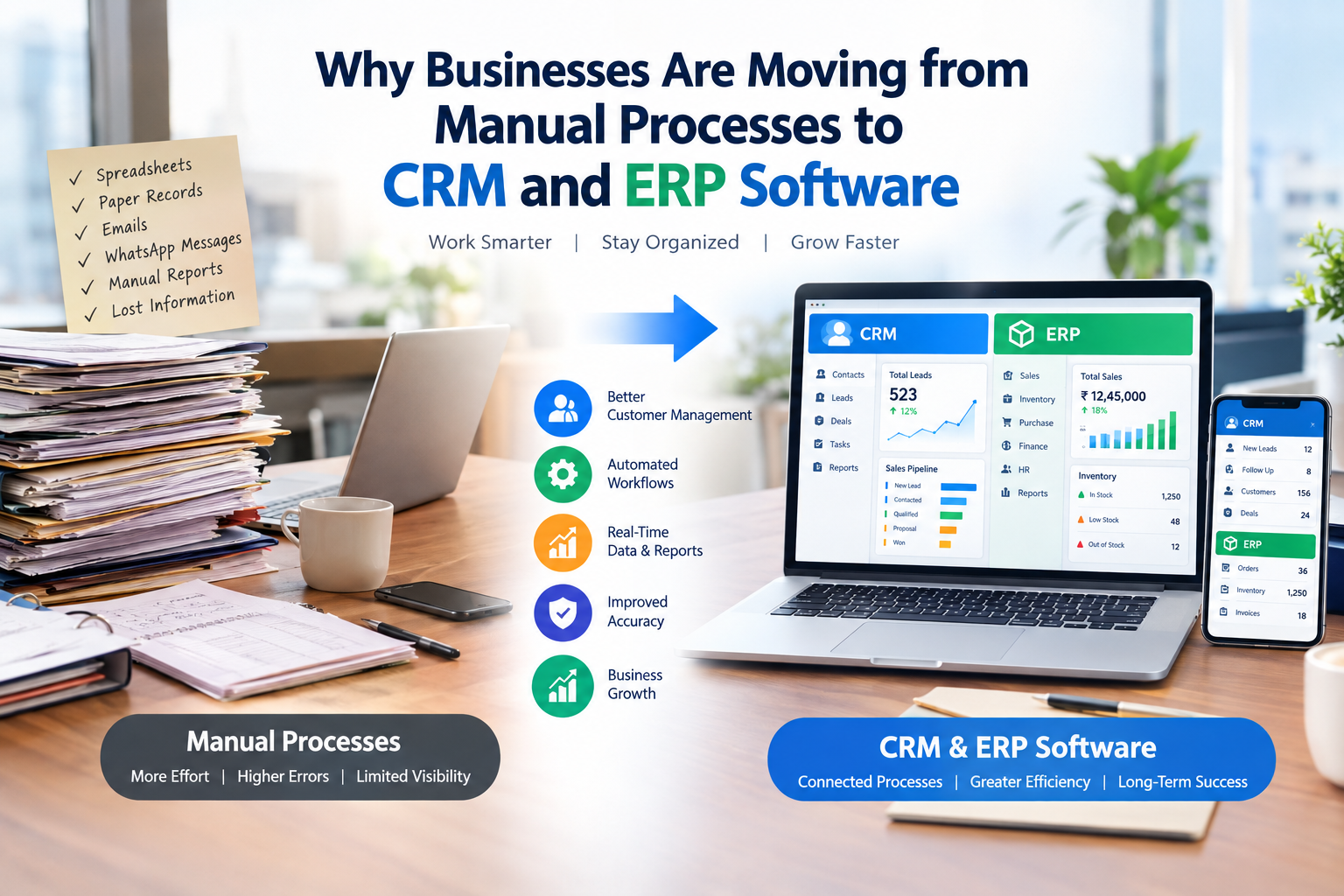
Many businesses still depend on spreadsheets, paper records, emails, WhatsApp messages, and manual data entry to manage their daily operations. While these methods may work when a business is small, they can become difficult to manage as the company grows.
Customer information may be stored in different places, employees may spend hours entering the same data, and important business information can be difficult to find when needed.
This is one of the main reasons businesses are moving from manual processes to CRM and ERP software.
CRM and ERP systems help businesses organize information, automate repetitive tasks, improve communication, and make better use of business data. Instead of managing different activities separately, businesses can use software to connect important processes in one centralized system.
In this blog, let's understand why businesses are making this transition and how CRM and ERP software can support business growth.
Table of Contents
- What Are Manual Business Processes?
- What Is CRM Software?
- What Is ERP Software?
- Why Are Businesses Moving Away from Manual Processes?
- Key Benefits of CRM and ERP Software
- CRM vs ERP: What Is the Difference?
- How CRM and ERP Work Together
- Signs Your Business Needs CRM or ERP Software
- Challenges of Continuing With Manual Processes
- How to Successfully Move From Manual to Digital Processes
- Frequently Asked Questions
- Conclusion
1. What Are Manual Business Processes?
Manual business processes involve completing business activities without specialized automation software.
For example, a business might use:
- Excel or Google Sheets for customer records
- Paper documents for employee or financial records
- Emails for internal communication
- WhatsApp messages for customer follow-ups
- Manual invoices and quotations
- Separate spreadsheets for sales tracking
- Physical files for storing documents
- Manual reports for management decisions
These methods are not necessarily wrong. They can be practical for small businesses with limited data and operations.
However, as the number of customers, employees, transactions, and departments increases, managing everything manually can become time-consuming and difficult.
2. What Is CRM Software?
CRM stands for Customer Relationship Management.
CRM software helps businesses manage their interactions and relationships with customers and potential customers.
A CRM system can help businesses manage activities such as:
- Lead management
- Customer information
- Sales pipelines
- Follow-ups
- Customer communication
- Sales activities
- Marketing campaigns
- Customer support
- Reports and analytics
For example, instead of keeping customer details in multiple spreadsheets, a CRM can store customer information in a centralized database.
Sales teams can then track where each lead is in the sales process and identify which customers require follow-up.
3. What Is ERP Software?
ERP stands for Enterprise Resource Planning.
ERP software is designed to help businesses manage different internal operations through an integrated system.
Depending on the ERP solution, businesses can manage:
- Finance and accounting
- Inventory
- Purchasing
- Sales
- Human resources
- Payroll
- Production
- Supply chain
- Projects
- Business reports
The major advantage of an ERP system is that different departments can work with connected business information instead of maintaining completely separate systems.
4. Why Are Businesses Moving Away From Manual Processes?
The shift from manual processes to business software is mainly driven by the need for efficiency, accuracy, visibility, and scalability.
As businesses grow, managing more information manually becomes increasingly difficult.
4.1 Increasing Amount of Data
Businesses generate large amounts of information every day.
Customer details, invoices, orders, employee records, inventory data, payments, and sales activities can quickly become difficult to manage using spreadsheets and physical documents.
CRM and ERP software can organize this information in a structured system.
4.2 Reducing Repetitive Work
Employees often spend significant time performing repetitive tasks such as:
- Entering customer information
- Creating reports
- Updating spreadsheets
- Sending follow-up reminders
- Preparing invoices
- Checking inventory
- Moving information between departments
Automation can reduce the amount of repetitive administrative work.
4.3 Improving Data Accuracy
Manual data entry can lead to mistakes.
A small error in customer information, inventory records, invoices, or financial data can create problems later.
Digital systems can reduce certain types of human error by standardizing processes and reducing duplicate data entry.
4.4 Better Access to Business Information
With manual systems, employees may need to search through multiple spreadsheets, emails, folders, or documents to find information.
A centralized CRM or ERP system can make relevant information easier to access, depending on user permissions and system configuration.
4.5 Supporting Business Growth
A process that works for 20 customers may not work efficiently for 2,000 customers.
CRM and ERP software can provide a more structured way to handle increasing customers, transactions, employees, and operational activities.
5. Key Benefits of CRM and ERP Software
5.1 Centralized Data
CRM and ERP platforms can bring important business information into centralized systems.
Instead of maintaining multiple disconnected files, teams can work with information stored within the appropriate software.
This can improve visibility and reduce unnecessary duplication.
5.2 Improved Sales Management
CRM software can help sales teams track leads throughout the sales pipeline.
For example:
New Lead → Contacted → Qualified → Proposal → Negotiation → Won/Lost
Sales managers can monitor opportunities and identify leads that require attention.
5.3 Automated Follow-Ups
Following up with potential customers is an important part of sales.
CRM software can help teams schedule follow-ups, record communication history, and manage sales activities.
This can reduce the possibility of leads being forgotten because of manual tracking.
5.4 Better Customer Management
A CRM can provide a more complete view of customer interactions.
Depending on the system, employees may be able to see:
- Contact details
- Previous conversations
- Purchase history
- Sales activities
- Support requests
- Follow-up records
This helps teams manage customer relationships more systematically.
5.5 Improved Inventory Management
ERP software can help businesses monitor inventory levels, purchases, sales, and stock movements.
For businesses that manage physical products, better inventory visibility can support more organized purchasing and stock planning.
5.6 Easier Financial Management
ERP systems can integrate financial and operational information, depending on the modules used.
Businesses may use ERP software to manage:
- Invoices
- Expenses
- Payments
- Accounting records
- Financial reports
This can reduce the need to maintain separate systems for different financial activities.
5.7 Better Reporting and Decision-Making
Business owners and managers need reliable information to make decisions.
CRM and ERP systems can provide dashboards and reports covering areas such as:
- Sales performance
- Revenue
- Customer activity
- Inventory
- Expenses
- Employee performance
- Business operations
Instead of relying only on manually prepared reports, managers can use available system data to understand business performance.
6. CRM vs ERP: What Is the Difference?
Although CRM and ERP software can work together, they have different primary purposes.
| CRM Software | ERP Software |
|---|---|
| Focuses mainly on customers and sales | Focuses on broader business operations |
| Manages leads and customers | Manages resources and business processes |
| Tracks sales pipelines | Can manage finance, inventory, HR and operations |
| Supports customer relationships | Supports internal business management |
| Useful for sales and marketing teams | Useful across multiple departments |
In simple terms:
CRM = Customer and Sales Management
ERP = Business Resource and Operations Management
For some businesses, using both systems can create a more connected digital business environment.
7. How CRM and ERP Work Together
CRM and ERP software can complement each other.
For example, imagine a customer places an order.
The CRM system may contain information about:
- Customer details
- Sales conversations
- Lead source
- Sales representative
- Previous interactions
The ERP system may manage:
- Order processing
- Inventory
- Billing
- Payment
- Accounting
- Delivery
When these systems are properly integrated, information can flow between customer-facing and operational processes.
This can reduce duplicate data entry and provide teams with better visibility into the customer journey and business operations.
8. Signs Your Business Needs CRM or ERP Software
Your business may need to consider CRM or ERP software if you experience problems such as:
1. Too Many Spreadsheets
If different departments maintain multiple spreadsheets and information is frequently duplicated, a centralized system may be useful.
2. Missed Customer Follow-Ups
If sales teams frequently forget to follow up with leads, CRM automation and reminders can help organize the sales process.
3. Difficulty Finding Information
If employees spend too much time searching through emails, files, and spreadsheets, centralized software can improve information access.
4. Repetitive Data Entry
If employees repeatedly enter the same information into multiple systems, automation or system integration may reduce unnecessary work.
5. Inventory Problems
Frequent stock discrepancies or difficulty tracking inventory can indicate a need for better inventory management.
6. Delayed Reports
If management depends on manually prepared reports and decisions are delayed because information takes too long to collect, business management software may help.
9. Challenges of Continuing With Manual Processes
Manual processes can create several operational challenges as a business grows.
Data Duplication
The same customer or business information may be stored in several files.
Human Errors
Manual data entry can result in incorrect or outdated information.
Limited Visibility
Management may not have an up-to-date view of sales, customers, inventory, or operations.
Slow Communication
When information is stored across multiple systems, employees may spend more time communicating and verifying information.
Difficult Scaling
Manual processes that work for a small company can become difficult to maintain as the business expands.
10. How to Successfully Move From Manual to Digital Processes
Moving to CRM or ERP software should be planned carefully.
Step 1: Identify Current Problems
Start by identifying which manual processes consume the most time or create the most errors.
Step 2: Define Your Requirements
Determine what your business actually needs.
For example:
- Lead management
- Customer management
- Accounting
- Inventory
- HR
- Reporting
- Automation
Step 3: Choose the Right Software
Do not select software simply because it has many features.
Consider your business size, budget, departments, workflows, integrations, scalability, and ease of use.
Step 4: Organize Existing Data
Before migration, clean duplicate, outdated, and incorrect data.
Step 5: Train Employees
Employees need to understand how and why the new system will be used.
Training can improve adoption and reduce confusion.
Step 6: Start With Important Processes
Businesses can consider implementing the most important workflows first rather than trying to change everything at once.
Step 7: Monitor and Improve
After implementation, regularly review how employees are using the software and identify areas that can be improved.
11. Frequently Asked Questions
Is CRM software suitable for small businesses?
Yes. CRM software can be useful for small businesses that need to organize leads, customer information, sales activities, and follow-ups. The appropriate system depends on the business's requirements and budget.
Is ERP software only for large companies?
No. ERP solutions are available for businesses of different sizes. However, the required features and complexity can vary depending on the company's operations.
Can CRM and ERP software work together?
Yes. CRM and ERP systems can be integrated in some business environments so customer-facing and internal operational information can be connected.
Does CRM software replace employees?
CRM software primarily helps automate and organize business processes. Employees are still responsible for customer communication, decision-making, strategy, relationship building, and other activities that require human involvement.
How long does it take to implement CRM or ERP software?
Implementation time varies depending on the software, business size, number of users, data migration requirements, customization, integrations, and training needs.
12. Conclusion
The move from manual processes to CRM and ERP software is part of a broader shift toward digital business management.
Manual processes may be suitable for simple operations, but growing businesses often need better ways to manage increasing amounts of customer, sales, financial, inventory, and operational information.
CRM software can help businesses organize customer relationships and sales activities, while ERP software can connect and manage broader business operations.
The goal is not simply to replace spreadsheets or paperwork with software. The real objective is to create more organized, connected, and efficient business processes that can support long-term growth.
Businesses that carefully identify their requirements, select suitable software, prepare their data, and train their employees can make the transition to digital processes more effectively.


Post a Review